ArcGIS efficiency suite

Extend ArcGIS.
Multiply productivity.

Alcana gives GIS and field teams focused tools for turning everyday ArcGIS work into organized, client-ready deliverables with fewer clicks.

See Photo Book
Sort Annotate Export
Full Alcana Photo Book gallery with ArcGIS field photos arranged for a report
Alcana Photo Book

Field photos in.
Polished reports out.

Connect to ArcGIS, organize project photos, add clear field markup, and produce a consistent PDF photo book without stitching together multiple tools.

  • Work from your ArcGIS dataKeep photos, captions, and project context together.
  • Make edits where they belongArrange, caption, and annotate inside one focused workspace.
  • Deliver a repeatable reportGenerate a clean PDF with configurable layout and metadata.
Product workflow

From photo set to final PDF.

A practical workflow, all inside Alcana Photo Book.

Hover, focus, or tap to preview
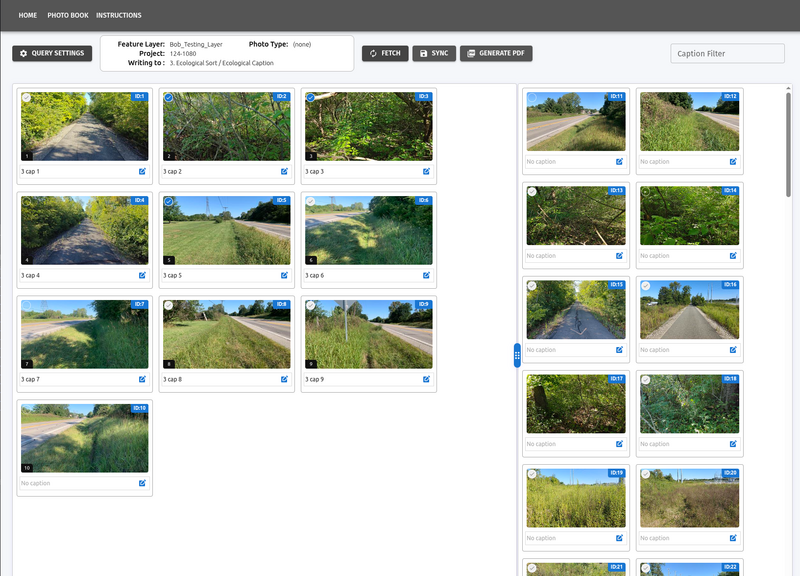
Photo gallery with field photos arranged in a report sequence
Arrange photosDrag field photos into the exact sequence your report needs.
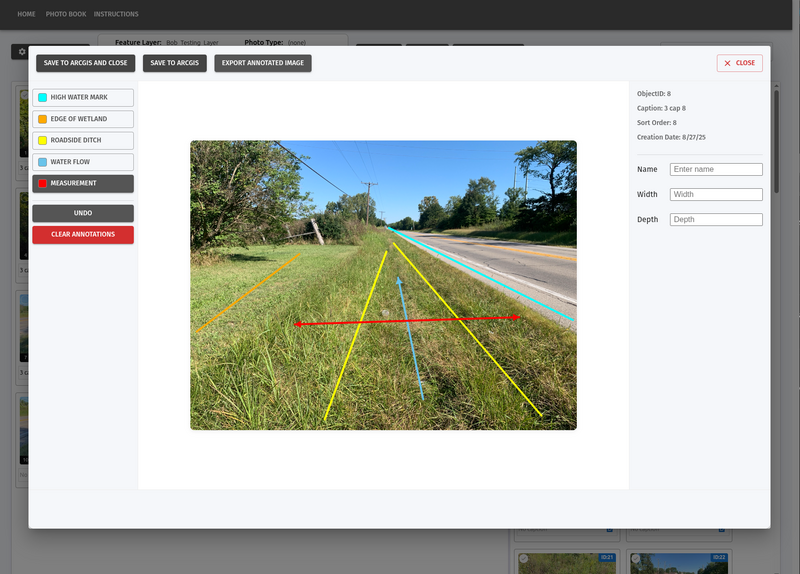
Photo annotation workspace with environmental markup tools
Annotate in contextAdd arrows, measurements, and field-specific markup directly.
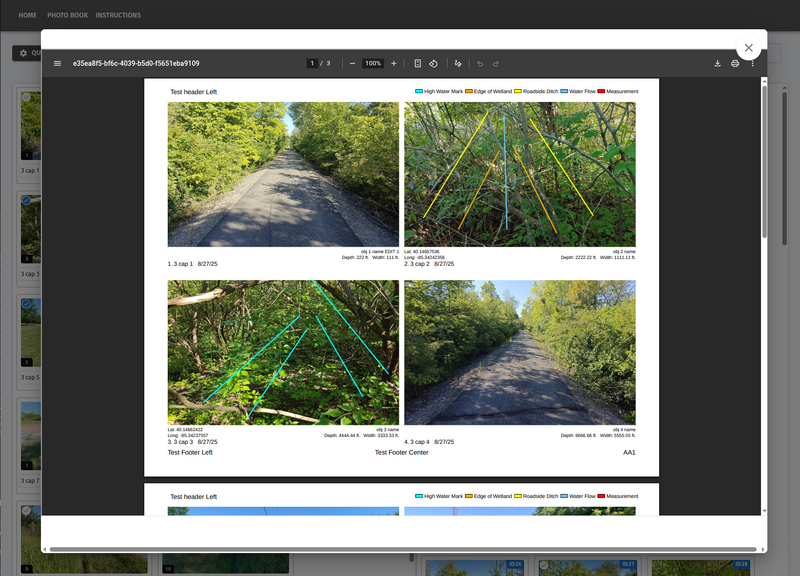
Generated PDF photo book preview with field photos and captions
Generate the photo bookExport a polished, configurable PDF ready to deliver.
Purpose-built tools

The fast way to build ArcGIS photo reports.

Replace scattered exports and one-off editing steps with a workflow designed around the way GIS and field teams actually deliver work.

Gallery workflow

Smart sorting & captions

Reorder photos visually and edit report captions without leaving the gallery.

Field markup

Integrated annotation

Mark up photos with arrows, highlights, measurements, and environmental context.

Report output

Consistent PDF output

Generate professional photo books with configurable layout, numbering, and metadata.

Plans

Choose the capacity your team needs.

Every plan includes the complete photo annotation workflow and professional PDF output.

Starter

$299 /month

Small teams and single-office firms.

  • 3 people in the app at once
  • 40 photo books per month
  • 1 connected ArcGIS Online organization
  • 1 report template, with your logo and colors
  • Full annotation tools: flow arrows, waterlines, freehand, callouts
  • Auto-captioning from AGOL attribute fields
  • 250 GB photo storage
  • Email support, next business day

Billed monthly at $359.

Enterprise

from $1,899 /month

Regional and national firms with GIS and IT teams who want a say in how this runs.

  • 25 people in the app at once, more on request
  • 500 photo books per month
  • Unlimited connected AGOL organizations
  • Unlimited report templates, built to match your existing deliverable
  • SAML single sign-on
  • Audit logging and user activity export
  • Custom data retention and deletion policy
  • 5 TB photo storage
  • Named support contact, response times set by agreement

Clear rules, no surprise lockouts.

See what every plan includes, how photo books and concurrent seats are counted, onboarding fees, and answers to common questions.

Plan details

How Alcana plans work

What every plan includes

Every Alcana account gets OAuth2 sign-in through ArcGIS Online, so nobody manages a second password. Photos stay in your AGOL org. Alcana reads them, works with them, and writes back to them. It does not become a second copy of your data that you have to reconcile later.

The annotation tools are in every tier. Flow direction, waterlines, extents, and callouts are all drawn on the photo and stored as editable objects you can move or delete later. We don't hold that back for a higher plan, because it's the reason most people try Alcana in the first place.

How we count photo books

A photo book counts once, when you first export it. Re-export the same book as many times as you want for the next 30 days and it still counts once.

We built it this way because the first PDF is never the last one. You'll catch a typo, a PM will want two photos swapped, or somebody will want the north arrow moved. That shouldn't cost you anything.

Go over your monthly count and we won't lock you out. Extra books are $8 each, and if you're consistently over, we'll tell you and move you to the plan that's cheaper for you.

Concurrent seats, not named users

You buy the number of people who can be in Alcana at the same time. You don't buy a seat for every person who might need it.

Environmental work is seasonal and lumpy. Twelve people might touch photo books in a busy June, three of them in January, and rarely more than a handful at once. Paying a per-person license for everyone who logs in twice a year makes no sense, which is why we didn't build it that way.

Add people to your org for free. Pay for the peak, not the headcount.

Onboarding

Getting Alcana talking to your AGOL org means registering an OAuth application, mapping your photo attribute fields to Alcana's caption and sort fields, and rebuilding your existing report template so the output looks like your deliverable and not ours. We do that work.

Starter$1,500
Pro$3,500
Enterprisefrom $7,500

Waived when you pay annually. Most firms do.

Typical time from kickoff to first real photo book is under two weeks.

Questions

Do we need an ArcGIS Online subscription?

Yes. Alcana reads from and writes to your AGOL feature layers, so you need an org and at least one user type that can edit them. We don't resell Esri licenses.

What happens to our photos?

They stay in AGOL. Alcana caches what it needs to render quickly and stores your annotations, captions, and sort order. Cancel and you can export everything, including the annotation layers, before your access ends.

Can we use our own report template?

Yes, and you should. Send us your current Word or InDesign deliverable during onboarding and we'll rebuild it. Starter includes one template, Pro three, and Enterprise as many as you need.

What if we go over 3 concurrent users?

The fourth person sees a short wait screen with their position in line, and gets in as soon as somebody closes the tab. Nobody loses work. If it's happening weekly, you want Pro.

Do the annotations write back to ArcGIS?

Sort order and captions do, on Pro and Enterprise. Annotations live in Alcana and render into the PDF. If you need them as AGOL geometry, ask us: it's on the roadmap and we prioritize by who's asking.

Can we pay monthly?

Starter and Pro, yes, at the rates listed. Annual saves you about 17% and waives onboarding.

Is there a nonprofit or agency rate?

Yes. .

Access request

Tell us about your team

Your request will be sent securely to the Alcana team.

Get started

See Alcana Photo Book with your workflow in mind.

We’ll walk through the product, answer your questions, and help identify the right annual plan for your team.